
Low Poly House 3D Models
Build entire villages and towns with lightweight low poly house models you can download instantly or generate from a text prompt, all optimized for real-time game engines.
Matching downloadable assets
Start with these seed models, then generate variants in the same low-poly direction.
Members unlock protected STL access
Use the free OBJ to test the shape. Subscribe for protected STL downloads now; GLB, FBX, USDZ and Unity are shown as production export targets, not direct library downloads yet.

Nature Starter Pack
Low-Poly Pine Tree
A lightweight forest prop with a trunk, two faceted foliage layers and a clean base pivot for scattering.
View details- Triangles
- 24
- Texture
- Flat color
- License
- Commercial use
- Formats
- OBJ
Protected STL download
Production export targets

Cozy Animal Pack
Low-Poly Fox
A stylized animal prop for cozy games, woodland scenes and AR previews.
View details- Triangles
- 24
- Texture
- Flat color
- License
- Commercial use
- Formats
- OBJ
Protected STL download
Production export targets
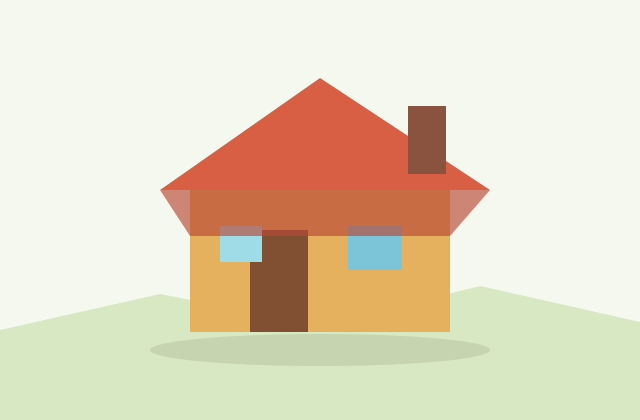
Village Starter Pack
Low-Poly Cottage House
A compact village building for cozy sims, isometric towns and stylized environment blocking.
View details- Triangles
- 18
- Texture
- Flat color
- License
- Commercial use
- Formats
- OBJ
Protected STL download
Production export targets
Highlights
- Typical budget: 500 to 3,000 triangles per house, lower for background fill
- Download GLB for web, Godot and AR; FBX for Unity and Unreal hierarchy
- Single 512 to 1024px atlas covers a whole modular house kit
- Origin at base center for clean grid snapping and rotation
- Use box or primitive colliders, not mesh colliders, for walls
- Perfect for village, RPG, isometric and city-builder scenes
- Modular kits let you mix roofs, walls and colors for variety
- AI-generated houses are yours to use commercially, no attribution
Low poly houses are one of the most reused building blocks in stylized games, which is exactly why keeping them light matters. A single house intended for an RPG village or isometric town usually lands between 500 and 3,000 triangles. Distant background structures can drop to a few hundred triangles, while a hero house that the camera moves close to may climb toward the upper end. If you are filling a large open world, lean toward the lower count and repeat a small kit of variations rather than modeling every house uniquely. Repetition reads as deliberate art direction in the low poly aesthetic, not as a shortcut.
Choosing the right export format depends on your engine. GLB is the best pick for the web, Godot, Three.js and AR because it bundles geometry, materials and textures into one self-contained binary file that loads cleanly. FBX is the stronger choice for Unity and Unreal because it preserves the object hierarchy, pivot points and material slots, which matters when a house has separate doors, shutters or a detachable roof. OBJ is universally readable and great for a static prop, but it carries no animation and no scene graph, so reserve it for simple single-mesh buildings.
Texturing a low poly house should stay deliberately cheap. A single shared atlas at 512 to 1024 pixels can cover the walls, roof tiles, wood trim and windows of an entire house kit, which keeps draw calls low when you scatter dozens of buildings across a scene. Many stylized projects skip detailed textures entirely and rely on flat-color or baked-gradient materials, letting the silhouette and roof angle carry the readability. If you do want subtle realism, metallic-roughness materials packed inside a GLB will render correctly in Three.js, Godot and the model-viewer web component without extra setup.
Import details make the difference between a house that drops in cleanly and one that fights you. Place the model origin at the base center of the footprint so the building snaps to a ground grid and rotates predictably. Decide on a facing axis early and keep every house in your kit consistent so doorways always point the same way before you rotate them in-engine. Houses rarely need a complex collider; a simple box or a few primitive colliders around the walls perform far better than a mesh collider and still stop the player from walking through walls.
These models slot naturally into village scenes, cozy RPGs, city builders, isometric strategy maps and tycoon games. Because the kit is modular, you can mix roof colors, swap a cottage roof for a flat townhouse top, or cluster a few houses around a well to suggest a settlement. When you generate a house with the AI tool, you own the result outright, so commercial use in a shipped game or asset pack is fine with no attribution required. Start from the prefilled prompt, tweak the roof shape or wall material, and download the format that matches your engine.
Build out your village
Frequently asked questions
How many triangles should a low poly house have?
Most game-ready low poly houses sit between 500 and 3,000 triangles. Use the low end for distant or repeated background buildings and the high end for a hero house the camera gets close to.
Which format is best for Unity or Unreal?
FBX, because it preserves the hierarchy, pivot points and material slots, so separate doors, shutters and roofs stay intact. For web, Godot or AR, choose GLB instead.
Can I use these houses in a commercial game?
Yes. AI-generated models are owned by you, so commercial use in a shipped game or paid asset pack is fine with no attribution required.
How do I keep many houses from slowing down my scene?
Share one texture atlas across the whole kit, keep triangle counts modest, reuse a few variations, and use simple box colliders so draw calls and physics stay cheap.
Where should the model origin be placed?
At the base center of the footprint. That lets the house snap to a ground grid, sit flush on terrain and rotate around a sensible pivot in-engine.
Related
Browse allNeed a custom low-poly model?
Generate one from a text prompt or reference image, then export GLB, FBX, OBJ or STL.
Open the generator