
Low Poly Food and Dish Prop Generator
Generate adorable low poly food props for cozy and cooking games, tiny enough to scatter dozens across a kitchen, with a single shared atlas and batch-friendly geometry.
Matching downloadable assets
Start with these seed models, then generate variants in the same low-poly direction.
Members unlock protected STL access
Use the free OBJ to test the shape. Subscribe for protected STL downloads now; GLB, FBX, USDZ and Unity are shown as production export targets, not direct library downloads yet.

Nature Starter Pack
Low-Poly Pine Tree
A lightweight forest prop with a trunk, two faceted foliage layers and a clean base pivot for scattering.
View details- Triangles
- 24
- Texture
- Flat color
- License
- Commercial use
- Formats
- OBJ
Protected STL download
Production export targets

Cozy Animal Pack
Low-Poly Fox
A stylized animal prop for cozy games, woodland scenes and AR previews.
View details- Triangles
- 24
- Texture
- Flat color
- License
- Commercial use
- Formats
- OBJ
Protected STL download
Production export targets
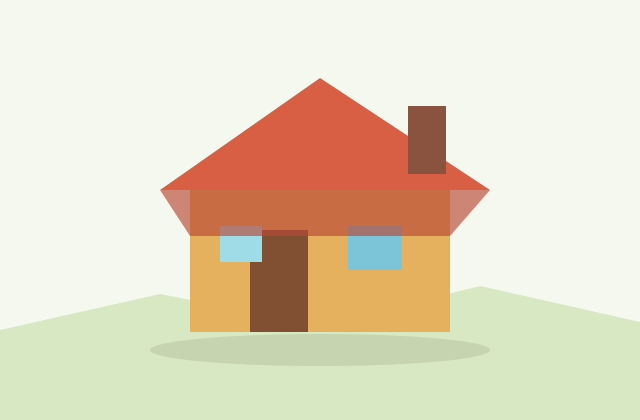
Village Starter Pack
Low-Poly Cottage House
A compact village building for cozy sims, isometric towns and stylized environment blocking.
View details- Triangles
- 18
- Texture
- Flat color
- License
- Commercial use
- Formats
- OBJ
Protected STL download
Production export targets
Highlights
- Cute, appetizing food props with rounded faceted forms and warm palettes
- Tiny budget of 100-800 triangles each so dozens scatter across a scene
- Batch instancing draws many copies of one dish in essentially one draw call
- Single shared atlas at 512-1024px with flat baked colors and gentle gradients
- Recolor atlas regions to turn one model into a whole menu of variants
- Self-contained GLB and USDZ for AR menus at real-world scale
- STL or 3MF for 3D printing charms, toppers, and merch from clean meshes
- FBX for Unity and Unreal cooking games; GLB for web, Three.js, and Godot
Food props are the seasoning of a game scene. A cozy cafe, a cooking simulator, or a farm kitchen comes alive when the counters are dotted with pancakes, burgers, bowls of ramen, slices of cake, and steaming coffee cups. Our generator specializes in these small, appetizing items, building them as rounded faceted forms with warm, inviting colors that read instantly as delicious. The charm of low poly food is that simple shapes plus the right palette make a dish recognizable at a glance, no photoreal detail required.
Because food items are tiny props you place in bulk, they are built to be extremely light, typically 100 to 800 triangles each. A single cupcake might be a couple hundred triangles, a full plated meal a few hundred more. That frugality is intentional: a kitchen scene can hold dozens of food items, an inventory grid can show hundreds of icons, and a buffet can sprawl across a table without ever straining the frame budget. Tiny props are exactly where low poly earns its keep.
Performance comes from batching. When you scatter the same apple, donut, or coffee cup many times, GPU instancing and batch rendering let the engine draw all of those copies in essentially one draw call. Pair that with a single shared atlas and an entire pantry of ingredients renders from one material. This is what keeps a busy cooking game smooth even when the screen is packed with plates, and it is especially valuable on mobile where draw calls are precious.
Texturing is deliberately simple. Every food item samples from one shared atlas, usually 512 to 1024 pixels, where flat baked colors and gentle gradients define each dish, the golden crust of a bun, the pink frosting of a cupcake, the green of a salad. No normal maps, no per-item textures, just clean color that suits the stylized look and keeps memory tiny. Because everything shares the atlas, recoloring a region instantly creates a new flavor or variant, turning one model into a whole menu.
Food props shine in extra contexts too. A single self-contained GLB file is perfect for an AR menu, where a diner points a phone at a table and sees the dish appear at real-world scale before ordering, and for iOS AR Quick Look you can export USDZ. Because the meshes are clean and simple, they are also great candidates for 3D printing: export STL or 3MF to produce a watertight printable model of a burger charm or a cake topper, keeping in mind that textures are ignored for printing. For engine work use FBX in Unity and Unreal, GLB for web, Three.js, Godot, and AR, and OBJ for static exchange. Everything you generate is yours commercially with no attribution required.
A simple workflow: generate the food set, confirm each item shares the atlas and sits at a sensible pivot for placement, then mark repeated items for instancing. Lay them out on counters or in an inventory grid, batch the duplicates, and export GLB for web and AR menus or FBX for a cooking game in Unity. Recolor atlas regions to expand a small set into a full menu of dishes, and STL the favorites if you want physical props or merch.
Dress a cozy kitchen scene
Frequently asked questions
How many triangles is a low poly food item?
Usually 100 to 800 triangles each. Food items are tiny props you place in bulk, so they are kept very light to let a kitchen scene or inventory hold dozens or hundreds without straining the frame budget.
How do I keep a busy kitchen scene fast?
Use batch instancing for repeated items and a single shared atlas so the whole pantry renders from one material. Many copies of one dish then draw in essentially a single draw call, which matters most on mobile.
Can I use these dishes in an AR menu?
Yes. Export a self-contained GLB, or USDZ for iOS AR Quick Look, and a diner can point a phone at a table to see the dish at real-world scale before ordering.
Can I 3D print the food models?
Yes. The meshes are clean and simple, so you can export STL or 3MF for a watertight printable model of a charm, topper, or merch piece. Textures are ignored when printing.
Are the food props free for commercial use?
Yes. AI-generated food props are owned by you and are free to use commercially with no attribution required, including in shipped games, AR menus, and merchandise.
Related
Browse allNeed a custom low-poly model?
Generate one from a text prompt or reference image, then export GLB, FBX, OBJ or STL.
Open the generator